People searching for IPTV Canada may be researching how internet television works, comparing providers or looking for a subscription they can evaluate before committing. If you are ready to compare plans, focus on the details that affect everyday use: the exact channels available in your province, the subscription term, the actual amount charged, compatible devices and how support handles setup questions.
Greadia offers subscription plans from €12 for one month, with longer options listed at €25 for three months, €32 for six months and €55 for twelve months plus one extra month. A trial may be available for 5–24 hours depending on timing and current availability. These prices are published in euros, not Canadian dollars. Before purchasing from Canada, ask Greadia to confirm country eligibility, payment currency and fees, the current catalogue for your location, and trial terms. You can compare Greadia plans, review the IPTV FAQ or contact the team before choosing.

What to compare when researching IPTV Canada
A large channel number or a headline that promises “everything” is not enough to decide whether a service is suitable. Build your comparison around the channels and programmes you actually watch, not the longest list on a sales page. Confirm the service’s distribution permissions, which content is included in the plan, the locations where it can be used and whether any sports or regional restrictions apply.
Next, examine the subscription itself. A useful provider explains the plan duration, total price, trial eligibility, renewal arrangements, cancellation process and how to reach support. Keep the answers to important pre-purchase questions in writing. That makes it easier to compare different IPTV services using the same standard instead of relying on marketing language alone.
- Availability: ask for the exact channel or programme, not just a general category.
- Price: compare the total amount charged for the full term, including exchange, payment or tax costs that may apply.
- Compatibility: confirm your actual TV, streaming device, operating system and player.
- Support: check how to ask questions before ordering and how technical problems are reported.
- Terms: read the trial, renewal, privacy and refund conditions before payment.
Greadia is a subscription service, not a TV box shop
It is important to distinguish an IPTV subscription from the equipment or app used to watch it. Greadia sells a subscription service; the guide discusses devices only because customers need a compatible way to access a service. A Fire TV Stick, Android TV box, smart television or IPTV player is not automatically included in the subscription, and this page is not offering those devices for sale.
Greadia’s pricing page advertises live-TV and on-demand categories, an electronic programme guide and support with setup. The precise catalogue, supported app and features available to a viewer in Canada should be confirmed directly before ordering. Do not assume that every named channel, league, new release or feature is available in every country or plan just because the service supports internet television.
Greadia plans and trial details for Canadian visitors
When assessing the best IPTV Canada option for your household, compare like with like. Greadia currently publishes four subscription durations: one month at €12, three months at €25, six months at €32, and twelve months plus one additional month at €55. The listed currency is euros. Your card issuer or payment method may calculate a different Canadian-dollar amount, and transaction costs can vary, so confirm the total payable before proceeding.
A trial is useful when the conditions are clear. Greadia lists a trial of 5–24 hours depending on timing and availability; it should not be assumed to be available for every request or to include every feature. Contact the team first and ask when the trial begins, what content is included, whether the same device you plan to use is supported and what happens when the trial expires. If the trial is not available at the time you enquire, make the decision using the published terms rather than assuming access will be granted.
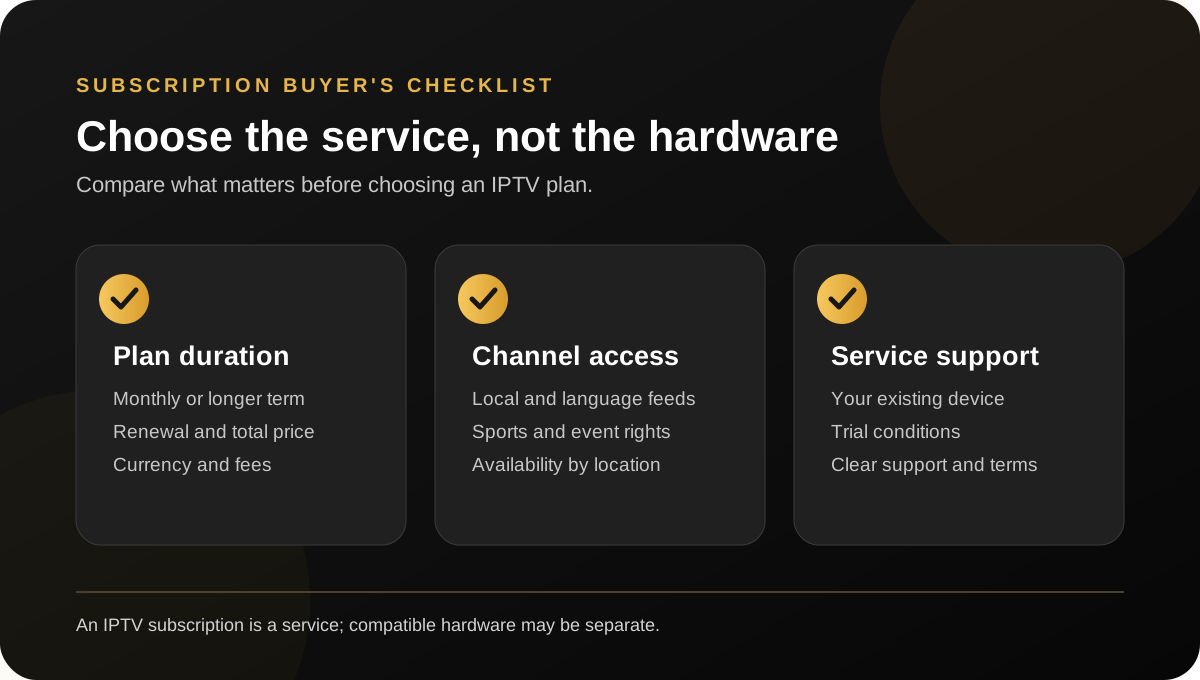
Before choosing a longer plan, open the Greadia pricing page and read the Refund Policy. If anything about the price, activation, renewal or availability is unclear, ask before payment. A written answer makes the choice more transparent and helps prevent misunderstandings about what the subscription includes.
Match the channel list to your province and language
Canada is not one uniform viewing market. A household in Québec may prioritise French-language channels, while viewers in Ontario, Alberta, British Columbia or Atlantic Canada may look for different local news, time zones or regional feeds. Families may also want a mix of English, French and other language programming. Make a shortlist of specific channels and programmes before contacting a provider.
Ask whether each requested channel is available in your location, whether it is live or on-demand, and whether the feed has regional limitations. A channel logo or category label does not confirm that the correct feed is accessible to every subscriber. Check the current channel list and test the content that matters most rather than relying only on a general promise of international coverage.
If you travel between provinces or want to use the service from more than one home, ask about location restrictions and simultaneous connections. Do not assume that a subscription behaves identically on every network or outside the location for which it was sold. Clear answers matter more than an overly broad “works everywhere” claim.
Check sports and live-event availability by name
Sports rights can be divided by league, competition, event, season and territory. A service may list sports channels without providing every match or event in every region. If hockey, basketball, football, motorsport, boxing or another competition is the reason you are considering an IPTV Canada subscription, give the provider the exact competition and the event you want to watch. Ask whether it is included for your location and under which plan terms.
Do not treat phrases such as “all sports” or “every premium channel” as a substitute for confirmation. Schedules, rights and regional blackouts may change. Before paying, request the current details for any must-watch event and retain the answer. This is especially important when choosing a longer subscription based on one upcoming match or tournament.
Use a compatible device you already own
IPTV is commonly viewed on supported smart TVs, Fire TV devices, Android TV platforms, phones, tablets and computers. The key question is whether the specific model and operating system work with the service’s supported player. Two televisions from the same brand can use different software, and an application available on one model may be absent from another.
Before subscribing, send Greadia the make and model of your TV or streaming device and ask which app or setup method is supported. Search terms such as Amazon Fire TV Stick, Android TV box and Formuler Z11 Pro Max refer to devices; they do not mean that Greadia is selling those products. If you already own a device, check compatibility and any extra app requirements before purchasing a subscription.
An IPTV player is software that organises and plays a stream; it does not automatically provide a channel catalogue or distribution rights. Install applications only from sources you trust, review their permissions and privacy information, and avoid unfamiliar downloads or requests for unrelated account credentials. If you want to use a phone and a TV at the same time, confirm the subscription’s simultaneous-stream limit first.

Understand your home internet and streaming quality
Playback depends on several factors: the source, the player, the device, Wi-Fi conditions and the path between your home and the stream. Weak wireless coverage, walls, household congestion, older software and background downloads can all affect performance. If possible, test near the router, pause large downloads and try a wired connection where the device supports it.
Do not rely on a promise that buffering is impossible. No internet video service can control every home network, device or temporary connection issue. Ask what the provider recommends for your intended use and what diagnostic details support needs if a problem appears. A useful support process should help you isolate whether the issue affects one channel, one device or the whole connection.
If an issue occurs, note the date and time, the channel or programme, device model, app and any error message. This is more actionable than reporting only that “IPTV is not working”. Restarting a player or router may help in some cases, but follow the device maker’s instructions and avoid factory resets until you have checked your saved settings.
Review support, privacy and refund terms
Strong customer support begins before payment. Ask clear questions about price, channel availability, the setup process, the duration of any trial and how to report a service issue. Greadia advertises 24/7 support; confirm the most suitable contact route and explain the device you intend to use. You can start from the Contact page or read the FAQ for general subscription questions.
Also read the Privacy Policy, Terms and Refund Policy. Understand how the subscription renews, how to request cancellation or help, and what evidence may be needed if a problem cannot be resolved. Keep a copy of the order confirmation and important support messages. Never send full payment-card details, passwords for unrelated services or identity documents in an unprotected chat.
How to evaluate a trial fairly
If a trial is offered, use it to test the things that matter to your household. Do not judge the entire service from a single channel or one brief moment. Check your must-have channels, navigate the programme guide, search for a relevant on-demand title if included, and test the device you intend to use regularly. If sports availability is critical, ask about the exact event rather than assuming it will appear during the trial.
Record any limitations and contact support if you encounter a problem. A short trial can help you learn about setup and navigation, but it cannot prove performance under every network condition or guarantee the future availability of each programme. Confirm the paid plan’s terms separately before you commit.
What does Internet Protocol Television mean?
Internet Protocol Television, usually shortened to IPTV, describes television content delivered using internet networks rather than only through traditional terrestrial, cable or satellite distribution. Depending on the authorised service, it can include scheduled live channels, on-demand programmes or an electronic programme guide. These are related features, but they are not interchangeable: a live channel follows a schedule, while video on demand is selected for playback when the viewer wants it.
Searches such as “IPTV from Canada” can mean different things: the searcher may be looking for a provider based in Canada, or a subscription that carries Canadian channels. Those are not automatically the same, so confirm the provider’s location, regional availability and exact channel list before paying.
The phrase “IPTV Canada” also covers different types of search. Some people simply want a definition; others are comparing subscriptions, checking compatibility or ready to buy. An IPTV player is the software used to organise or play streams, while a subscription is the service access agreement. A player by itself does not automatically supply channels or permission to watch protected content. Keep these distinctions clear when comparing providers and avoid assuming an app listing proves that a particular channel is included.
How to compare IPTV providers without relying on rankings
Search results and “top provider” lists can be a useful starting point, but a ranking is not a substitute for checking whether a service fits your household. Reviews may discuss different countries, plan dates, devices or expectations. Some may also be out of date. Use the same questions for every provider you consider so your decision is based on comparable information.
Start with a short list of five to ten must-have channels or programmes, then ask each provider to confirm those items for your location. Compare the exact term, price currency, activation requirements, trial conditions and refund process. Ask which player is supported on your device and what help is available if setup does not work as expected. Finally, weigh how relevant the catalogue is to you: thousands of international listings are not necessarily more useful than a smaller list containing the channels you actually watch.
For a fair comparison, give the strongest weight to details you can verify: a current written channel list, clear payment terms, supported devices, responsive answers and published policies. Treat broad claims about “the best” service, unlimited access or perfect playback as statements to investigate, not proof. The provider comparison checklist on Greadia can help you apply the same criteria across multiple options.
Questions to ask before subscribing
A few specific questions before you pay can save time later. Explain that you are viewing from Canada and name your province or city; then request confirmation of eligibility and the channels you need. Tell the provider the exact TV or streaming device model, rather than asking only whether the service “works on smart TVs”. If you plan to watch a particular sports competition, share the competition name and event date, because channel availability and rights may differ.
Ask for the total price in the currency that will be charged, including potential card conversion or payment fees. Clarify the length of any trial, when access begins and whether the trial catalogue matches the paid plan. Before ordering, read the renewal and cancellation terms as well as the refund policy. If the answer is vague, ask for clarification before making a longer commitment.
For Greadia, those checks are especially straightforward: consult the published subscription plans, then contact the team to confirm Canadian availability, current content details, payment currency and the trial conditions available at the time of your enquiry. Do not assume that an advertised option necessarily applies to every region or every request.
Judge value by your viewing routine, not the headline count
A household that watches local news each morning has different needs from a viewer who mainly wants on-demand films or follows a small number of sports events. Before choosing a plan, consider how often the service will be used, how many people need access, the languages required and whether viewing happens on one screen or more than one. Confirm the simultaneous connection limit and any location restrictions instead of assuming you can share one plan across multiple homes.
Also consider the amount of help you may need. Someone who is comfortable setting up a player may prioritise different support than a family that wants guided installation. A clear support channel, a documented setup process and a readable refund policy all contribute to the overall value of a subscription. Those details can matter as much as a low headline price, particularly if you intend to keep the plan for several months.
IPTV Canada buyer checklist
- Confirm that the service can be used in your location and ask for current channel availability.
- Check rights and restrictions for the particular channels, titles or sports events you care about.
- Compare the full plan price and currency, including potential exchange or transaction fees.
- Ask whether a trial is available, how long it lasts and what is included.
- Confirm the exact TV/device model, operating system and supported player.
- Understand the renewal, cancellation, privacy and refund terms before paying.
- Keep the confirmation and contact support promptly if the service differs from what was agreed.
For Canadian readers comparing the best IPTV Canada option, the most sensible choice is the one that matches your actual viewing priorities, gives straightforward answers and states the subscription conditions clearly. If Greadia is on your shortlist, review the current subscription plans, confirm Canadian availability and payment details with the team, and make sure any specific channel or sports requirement is answered before ordering.
Frequently asked questions
What should I check first when searching for IPTV Canada?
Start with your required channels and language, then confirm location availability, subscription price and currency, compatible devices, trial conditions and support terms. The largest channel count is not automatically the best fit.
Is Greadia selling an IPTV box or an app?
No. Greadia offers subscription service options. A supported TV, streaming device and compatible player are separate requirements unless the provider specifically confirms otherwise. Ask about your exact model before paying.
How much does a Greadia subscription cost?
Greadia currently lists €12 for one month, €25 for three months, €32 for six months, and €55 for twelve months plus one additional month. Prices are listed in euros. Confirm the final payment amount, fees and terms before ordering.
Can I get an IPTV free trial from Greadia?
Greadia lists a trial lasting 5–24 hours depending on timing and availability. Contact the team before activation to verify eligibility, duration, included content and conditions for your request.
Will every Canadian local channel or sports event be available?
Do not assume so. Availability and distribution rights may vary by location, package, channel, event and season. Ask for confirmation of the exact feed or competition you want before subscribing.
Can I use my Amazon Fire TV Stick or Android TV device?
Compatibility depends on the exact model, operating system and supported player. Share those details with Greadia before paying; mentioning devices here does not mean they are sold by Greadia.
What if a channel does not work after I subscribe?
Record the channel name, time, device, player and error message. Check your connection and whether other channels work, then contact support for troubleshooting. Read the published Refund Policy to understand the applicable process and conditions.